Houseplant Monitoring System
Aug 2025
Introduction
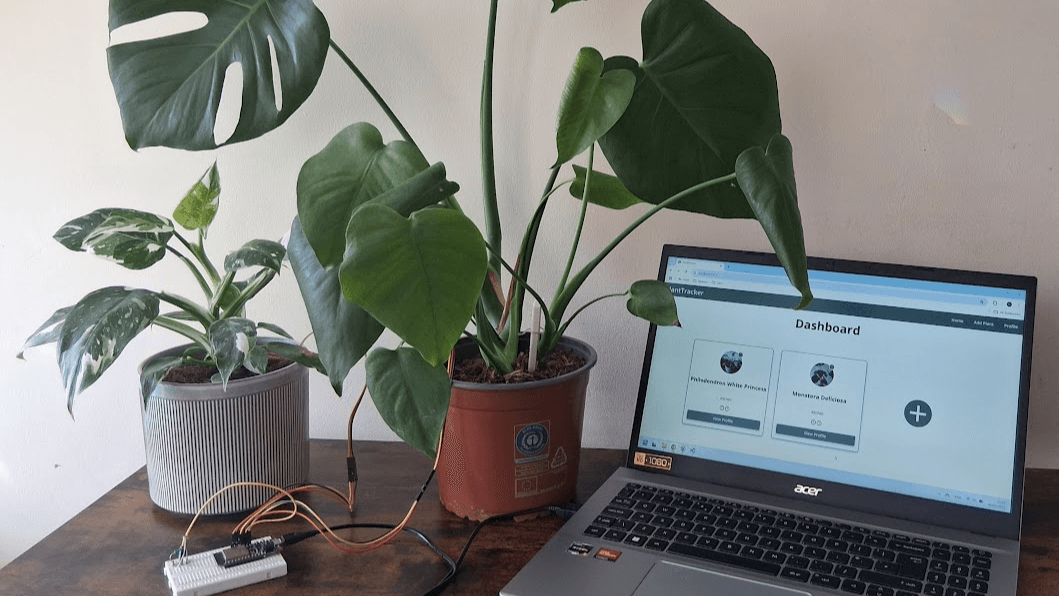
A full-stack MERN (MongoDB, Express, React, Node.js) web application that integrates with an ESP32 Feather microcontroller to monitor and visualise live plant sensor data. The ESP32 periodically takes light and soil moisture readings and sends them via Wi-Fi to the server, for storage in the database. The front end displays a dashboard overview of each plant and evaluates its status based on the current sensor data.
Website Demonstration
Background
The Problem
Some people find it challenging to care for their houseplants and keep them healthy within their home. Since poor care can lead to plant stress or plant death, it's important to care for plants properly.
Some common challenges are:
- Understanding the specific care and conditions that a plant requires
- Knowing the actual conditions within your home, such as light levels
- Remembering to water a plant, or knowing the best time to do so
- Adjusting plant care in line with seasonal changes
- Interpreting plant feedback, which is often slow or ambiguous, such as yellowing leaves
The Solution
To address these issues, this project provides users with a clear way to monitor all of their houseplants. The dashboard presents overviews of each plant, so the user can quickly identify any issues or needs. Intuitive status icons make plant feedback unambiguous, and through using real-time sensor data, the user can understand the underlying conditions in their home and identify the source of any issues. Users can take a more detailed look at any of their plants by visiting a plant's profile, which provides further information and sensor-based metrics.
Features
- Dashboard overview displaying all plants with real-time status icons
- Individual plant profiles showing detailed plant and sensor data
- Live soil moisture and light readings recorded by ESP32 sensors
- External API integration to fetch missing plant data
- Graphs visualising historical sensor data
- Forms to add new plants or edit existing information
System Architecture
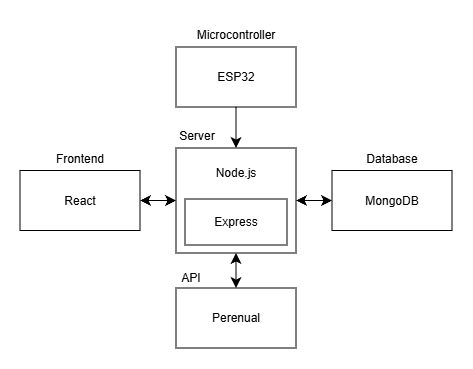
The system is based on the MERN stack, using React for the frontend, Express and Node.js for the backend, and MongoDB as a database. An ESP32 Feather microcontroller is connected, and sends sensor readings to the backend, which is then sent to and stored in the database. User plant data is also stored in the database, which is rendered dynamically on the frontend. The server also fetches omitted data from an API, such as plant images.
Frontend
The frontend is built with React for the user interface. It uses HTML and JavaScript, paired with pure CSS for page stylings. It is designed to be responsive across a range of screensizes, from small mobile screens to large desktops. There are four page types: the dashboard, plant profiles, add plant and edit plant.
Dashboard
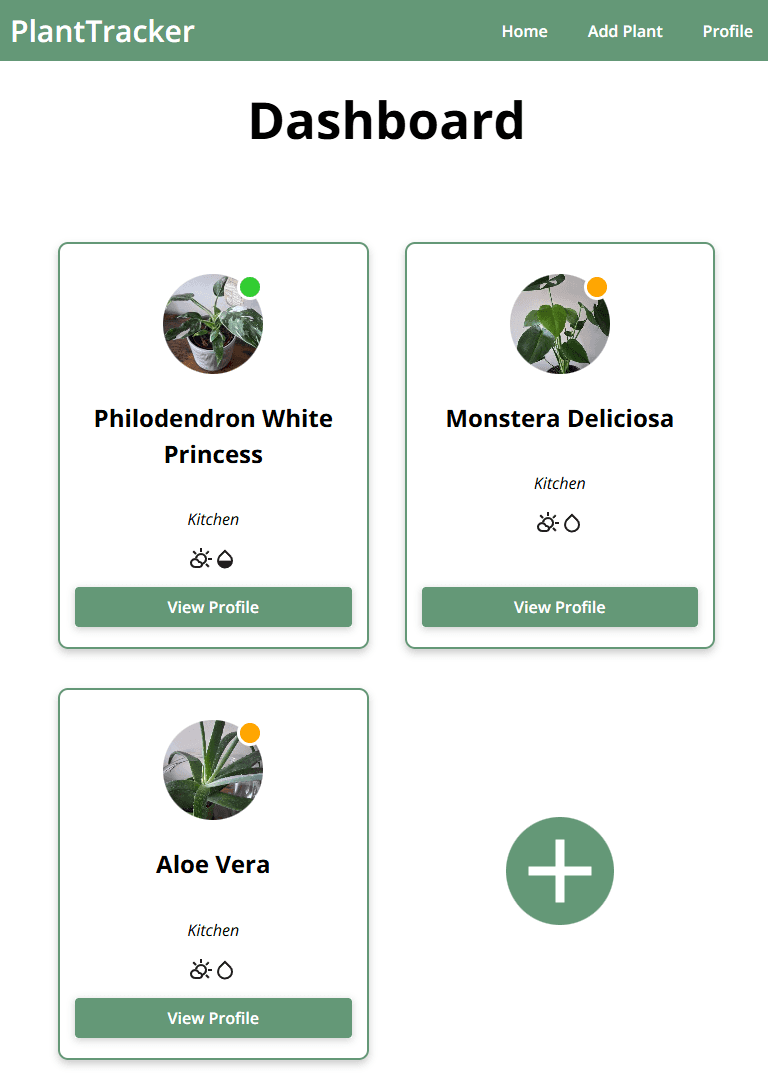
The dashboard page acts as the site's homepage, and displays an overview of all of the user's plants. Each plant is represented by a mini profile, which uses a component called PlantMiniProfile. Once a user's plant data is fetched from the database, each record is mapped to one of these components.
Mini profiles show a plant's image, name, location, status and conditions. The status and conditions icons are calculated based on live sensor data. If no image is uploaded for a particular plant, a picture of that plant species is fetched from the Perenual API.
The dashboard also includes a + button, which takes the user to a page where they can add new plants via a form.
Plant Profile
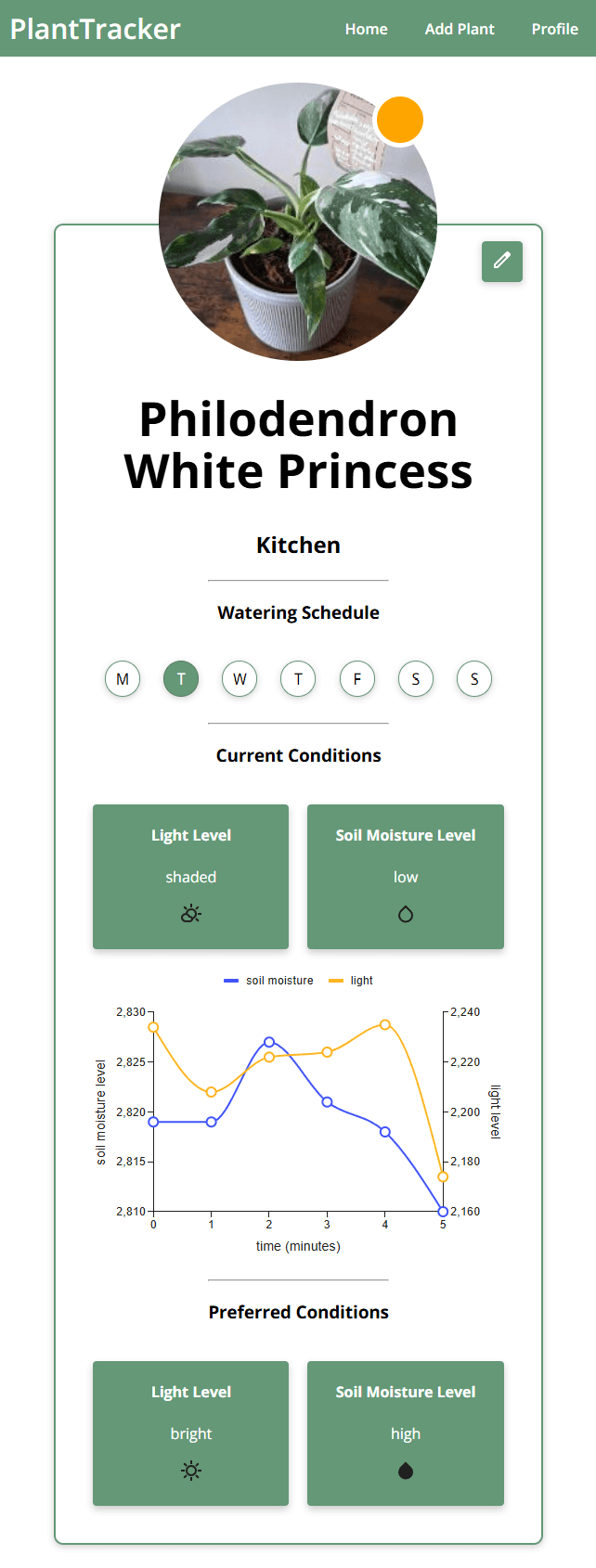
Each plant profile page uses a component called PlantProfile. This is used to display more in-depth detail about a specific plant, including:
- An image of the plant
- A status icon indicating current plant conditions
- The species name
- The location
- The (placeholder) watering schedule
- Current plant conditions, including current light and soil moisture levels
- A graph of historic sensor readings
- (Placeholder) preferred conditions
Much of this information is retrieved from the database by the component, based on the plant's ID which was passed into the URL path parameters. This also allows plant profile pages to be generated dynamically for each of the plants a user has stored.
The plant status icons are notable, as they are calculated based off of the last sensor readings taken to give a live assessment of how the plant is doing. They are currently calculated based on specific thresholds, but ideally in future this would be calculated based on API plant-specific data.
Add / Edit Plant
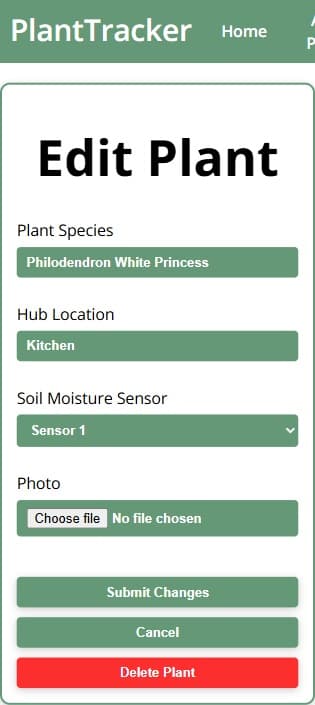
The pages to add a plant and edit a plant are very similar, and both provide a form for a user to fill out.
The page to add a new plant uses a component called AddPlantRecord, and allows a user to store a new plant on the website. The Plant Species field and the Hub Location field both are text input fields, however they provide suggestions that filter as the user types. The Soil Moisture Sensor field is a simple dropdown, and allows the user to pick from the sensors that are currently stored in the system.
On the other hand, the page to edit a plant uses the EditPlantRecord component, and allows a user to change the currently stored details for an existing plant. The form automatically populates itself with plant details from the database, but allows the user to change any field. They may press the submit changes button to save their new data to the database. Alternatively, the edit plant form also provides a button to delete the plant, which will remove it from the database and redirect the user to the homepage.
Because MongoDB can't directly store image files, the photo upload field converts the uploaded file into a base64 string format first. This string can then be stored in the database.
Backend
The backend consists of a server, built using Express and Node.js, and a MongoDB database. The server handles all requests between the website, database, microcontroller and API to transfer data across to each segment.
Server
The server is a RESTful API that handles HTTP requests at specific endpoints. It is structured around these four main endpoints:
- /plant - Handles interaction between the website and the database. Typically used for:
- Retrieving a user's plant details
- Creating new records for newly added plants
- Deleting one of the user's plant records
- Updating a plant record with changes
- /species - Handles interaction between the frontend and the database. Typically used for:
- Retrieving plant species details for plant types stored in the system
- /api - Handles interaction between the frontend and the plant API. Typically used for:
- Getting an image of a plant when the user did not upload one
- /hub - Handles interaction between the microcontroller and the database, and between the frontend and the database. Typically used for:
- Storing light and soil moisture sensor readings
- Retrieving hub details for a user's microcontroller hub
- Retrieving a plant's light and soil moisture data
Database
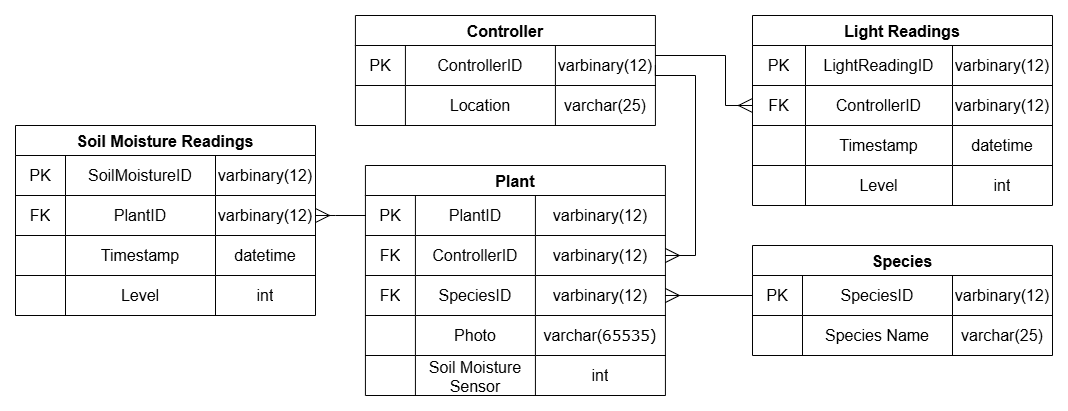
The database uses MongoDB to store information regarding a user's plants and hubs. It is structured using the following tables:
- Plant Table - Holds plant details such as its controller, species, photo and which soil moisture sensor it uses
- Species Table - Holds names of plant species the system can recognise
- Controller Table - Holds microcontroller details such as location
- Light Readings / Soil Moisture Readings Tables - Holds data recorded by light or soil moisture sensors, such as level and timestamp
The structure of the database is also highlighted in the UML diagram below.
Below is a screenshot displaying the database structure on the MongoDB website, along with some sample plant records.
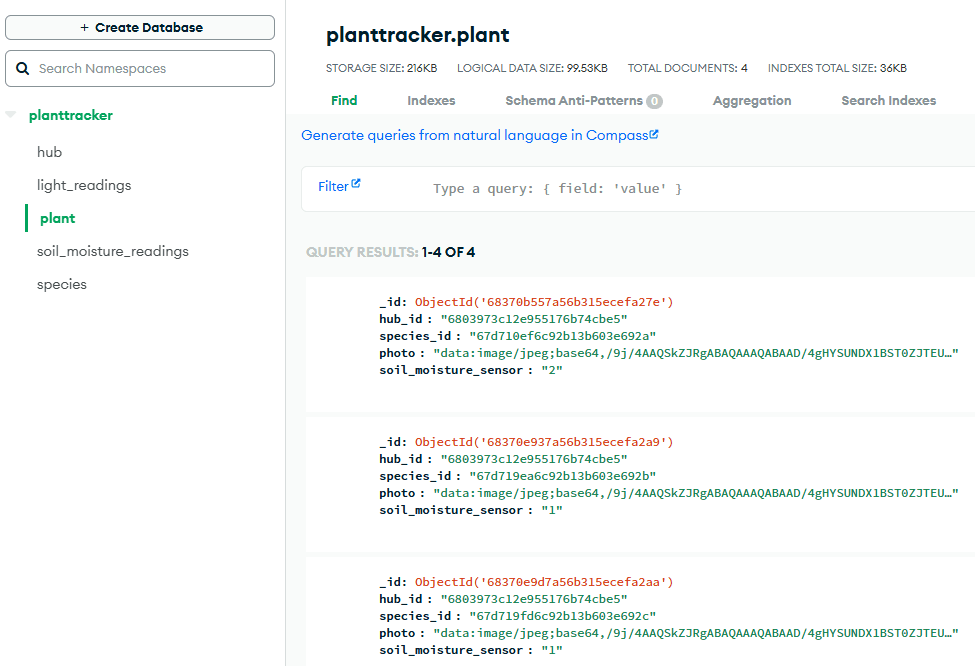
The light_readings and soil_moisture_readings tables are set up to be time-series collections, and automatically delete records after a certain amount of time has passed. This is due to the large volume of sensor readings being stored, but only recent readings being used.
Microcontroller
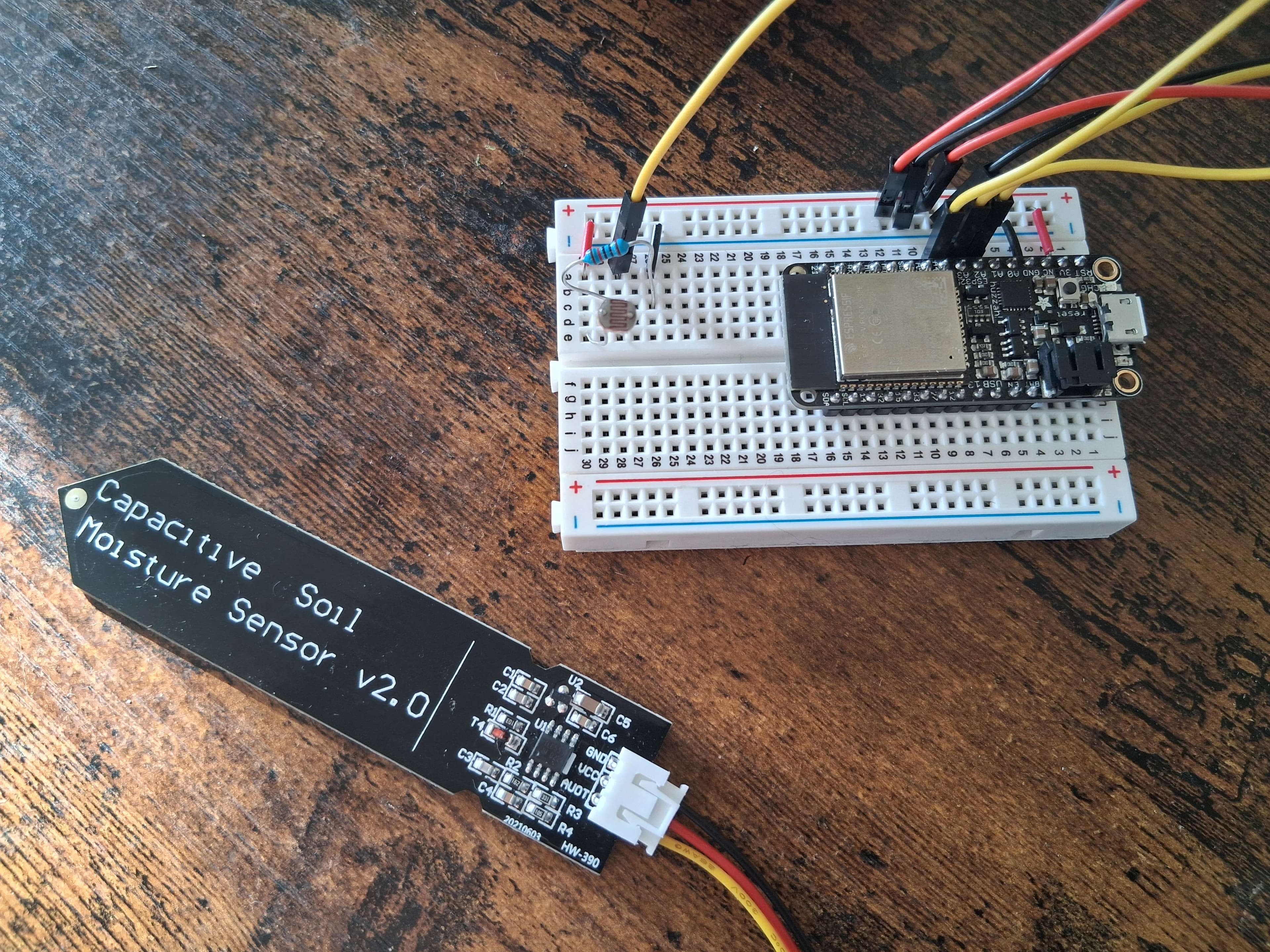
The microcontroller used is an Adafruit HUZZAH32 ESP32 Feather Board. It is connected to two capacitive soil moisture sensors, which can be inserted into soil to give soil moisture readings. It is also connected to one photoresistor, which can be measured to find light levels.
Below is a circuit diagram of the microcontroller system.
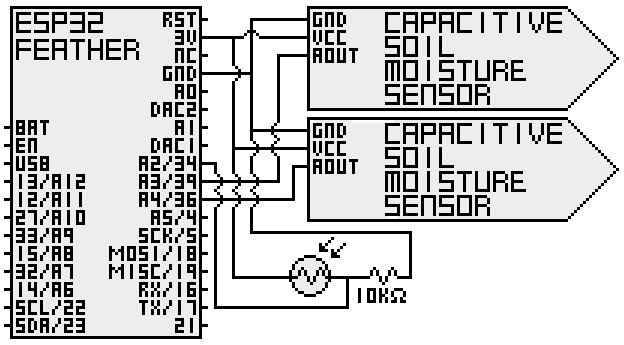
The microcontroller uses Wi-Fi to interact with the server. After taking readings at regular intervals, it stores these readings in JSON format, then sends HTTP POST requests to the server. The server handles these requests by processing the data and storing it in the database.
Below is an image of the microcontroller system.
API
The API used for plant data was Perenual, which provides information on plants, including things like names, images, and importantly sunlight and watering preferences. I had planned to use the API for preference data so that the light and soil moisture readings taken by the microcontroller could be compared against what each plant actually needs. However, I did not have time to implement this. Instead, the API is currently used for retrieving a plant's picture when the user does not upload one of their own.
What I Learned
I learned a broad range of skills and technologies through the development of this project. Particularly noteable is the use of a JavaScript framework, pairing this with the MERN tech stack to build a full stack, interactive web app connected to live data readings. Here are the key skills and technologies I learned:
- React and how to use JavaScript frameworks
- Node.js and Express.js for backend server development and request handling
- MongoDB and handling NoSQL data
- WiFi transmisssion and HTTP protocols
- ESP32 microcontrollers
- MERN stack and how each technology works together to build a full stack application
Limitations
There are some limitations of the current system, and ways it could be improved. Here are some of the current limitations, and the features that would fix them:
- Plant-specific condition data - The system currently evaluates every plant's status in the same way. If the system retrieved such data from the API, it could give more accurate status icons. For example, a plant that needs very little water could display a green status even if the soil is quite dry.
- User accounts - The system does not currently handle multiple user accounts or logins, so there is technically only one user account available. By adding user accounts, multiple users could sign up and keep track of their own plants, without being able to see other user's plants.
- Hub addition - There is not currently a way for a user to have multiple hubs, because of the limited microcontroller resources I had. If functionality were added to be able to add new hubs to the system, users could keep track of their plants in multiple different locations.
- Watering schedules - I would have liked to include a system that would provide watering schedules for each plant, and alert the user when it is time to water their plant. Currently, there is only a placeholder of this on each plant profile.
- Seasonal changes - The system does not currently consider the season or even time of day when it evalauted the readings. For example, it does not know when it is night, but even though the light readings show it is dark, it may think the conditions are bad for the plant. This would be solved by integrating a calendar or clock system, so that it can make adjustments to its evaluation as needed.
Future Improvements
I had several extension goals in mind as I was planning the project. I identified that these goals would make the system better if they were included, however I did not expect to have the time to implement them. If more time was spent developing this project, these features would be a great addition:
- Hub case - It would have been good to design, model and 3D print a case for the microcontroller system. Not only would this make the system feel more polished, but it would also be necessary for the system to be protected and waterproof if it were to become an actual product.
- Extra sensors - Adding more sensors to the hubs would allow for more comprehensive data on plant conditions. For example, adding a humidity and temperature sensor could provide extra insight.
- Alternate power source - Currently the system is powered by a USB directly, but if the product were in use, it may be more convenient if the power source were battery powered or chargeable, so that it could be placed somewhere that does not require a plug socket nearby.
- Website hosting - The website is only run locally at the moment, but to become used in the real world, it should be hosted online.
- Plant identification - Sometimes people don't know what species their plant is, which would make it difficult for the website to know the needs of the plant. Adding a plant identification feature would solve this, as the user would be able to look up their plant.
- Calendar integration - Adding calendar integration would allow for watering schedules and reminders to be shown on user's personal calendars or phone notifications. This would be much more convenient than having to sign into the website to check schedules every time.
- API call limit - There was a call limit on the API I was using. If this system were scaled up with multiple users, higher call rates would need to be subscribed to.
- Sensor unreliability - Sensors are not always reliable, which is a problem when trying to obtain accurate readings. For example, the soil moisture sensor could be affected by the soil type, meaning it may not register the level of moisture correctly between different plants. This could be solved by adding a calibration option.